Converting large csv's to nested data structure using apache spark
What is Apache Spark ?
Apache Spark brings fast, in-memory data processing to Hadoop. Elegant and expressive development APIs in Scala, Java, and Python allow data workers to efficiently execute streaming, machine learning or SQL workloads for fast iterative access to datasets.
Quick start guide
Problem Statement / Task
To read lots of large CSVs (~GBs) from Hadoop HDFS, clean them, convert to a nested data structure, and write to MongoDB using Apache Spark.
I was assigned to create a Mongo collection with select financial values by reading CSVs containing income statements, balance sheets, and other data.
CompanyID,USDAmount,YearEnding,Label,BalSubCategoryName,BalSubCategoryCode,LabelOrderId,SubCategoryOrder
1235,14737.251,31-01-2010,Non-Current Assets,Intangible assets,Non_Curr_Asset_Sub_03,12,152
1235,0,31-01-2009,Non-Current Assets,Intangible assets,Non_Curr_Asset_Sub_13,13,155
1235,10733.189,31-01-2011,Non-Current Assets,Intangible assets,Non_Curr_Asset_Sub_10,11,125
Shown above is a sample CSV. I had to convert them into the schema shown below and write them to MongoDB. Consider that each CSV is about 1 GB and you have hundreds of them.
{
    "1235": {
        "2009": {
            "Non-CurrentAssets": 0
        },
        "2010": {
            "Non-CurrentAssets": 14737
        },
        "2011": {
            "Non-CurrentAssets": 10733.189
        }
    }
}
Approach
- Data Cleaning - Read multiple types of CSVs and convert all of them into tuples of structure
(CompanyName, Map<Year, Map<TagName, Value>>>). - Union all created RDDs - Join all the cleaned CSV RDDs into one.
- Reduce - Reduce all tuples related to a company into a single tuple using companyName as the key.
- Update MongoDB - Update MongoDB with the reduced tuples.
Data Cleaning
The order of fields in the CSV dump differs by type, so I had to write a generic function where we can specify the position of required fields. Let’s call this function on both income-statement.csv and balance-sheet.csv to create two cleaned RDD datasets balanceSheetRdd and incomeStatementRdd, then join them into masterRdd.
// Function definition
JavaPairRDD<String, Map<String, Map<String, String>>> dataclean(
			JavaSparkContext sc,                      // Spark Context
			String filepath,                         // path to file in Hadoop
			final Set<String> filterTag,             // Required financial tags
			final int pos_tag,  final int pos_cname, // Position
			final int pos_date, final int pos_value)
The spark-csv plug-in can be used to read CSVs into a dataframe RDD. The plug-in is recommended over map(line.split(",")) for its ability to handle quotes and malformed entries.
DataFrame df = sqlContext.read()
				.format("com.databricks.spark.csv")
				.option("header", "true").load(filepath);
// spark-csv outputs dataframe to iterate line by line
// we will have to convert it to RDD of Rows
JavaRDD<Row> rowRdd = df.javaRDD();
Create two Java sets with required tags to extract from the CSV.
// Income Statement required tags
final Set<String> filterTagsIS = new java.util.HashSet<String>();
filterTagsIS.add("Revenue");
filterTagsIS.add("Cost of sales");
// Balance Statement required tags
final Set<String> filterTagsBS = new java.util.HashSet<String>();
filterTagsBS.add("Total Non Current Assets");
filterTagsBS.add("Total Assets");
Filter out the unwanted tags using Spark’s filter action.
filteredRdd = rowRdd.filter(new Function<Row, Boolean>() {
@Override
public Boolean call(Row r) throws Exception {
	return filterTag.contains(r.getString(pos_tag));
}
})
From the filtered RDD, create a new PairRdd (tuple) of the form (CompanyName, Map<Year, Map<TagName, Value>>>) using Spark’s mapToPair action.
cleanedRdd = filteredRdd.mapToPair(
new PairFunction<Row, String, Map<String, Map<String, String>>>() {
	@Override
	public Tuple2<String, Map<String, Map<String, String>>> call(
			Row r) {
		Map<String, String> m1 = new HashMap<String, String>();
		Map<String, Map<String, String>> m2 = new HashMap<String, Map<String, String>>();
		String label = r.getString(pos_tag);
		// create a map of the form { Tag : value }
		m1.put(label, r.getString(pos_value));
		String year = r.getString(pos_date).substring(
				r.getString(pos_date).length() - 4);
		// create a map of the form
		// { year :  { tag : value }   }
		m2.put(year, m1);
		return new Tuple2<String, Map<String, Map<String, String>>>(r.getString(pos_cname), m2);
	}
}
);
Now we have cleaned the entire CSV file contents into the desired format. Here I have arranged the filter and mapToPair actions into a data cleaning class.
Union
Assuming we have created two RDDs, balanceSheetRdd and incomeStatementRdd, using the above method. Make a master RDD using Spark’s union transformation. From here on, masterRdd will be used instead of balanceSheetRdd and incomeStatementRdd.
masterRdd = balanceSheetRdd.union(incomeStatemntRdd)Reduce
Reduce the master RDD with companyName as the key. The idea is to aggregate all financial details related to a company by year. Calling reduceByKey() on masterRdd will produce an iterable list using companyName as the key, but we need to do more: we have to aggregate by year. We can do this by writing a custom class implementing Function2.
reducedRdd = masterRdd.raduceByKey(new reduceMaps())The reduceMaps class takes two tuples with the same companyName and reduces them by grouping the tags by year.
final class reduceMaps
		implements
		Function2<Map<String, Map<String, String>>, Map<String, Map<String, String>>, Map<String, Map<String, String>>> {
	public Map<String, Map<String, String>> call(
			Map<String, Map<String, String>> map0,
			Map<String, Map<String, String>> map1) throws Exception {
		Set<Entry<String, Map<String, String>>> emap0 = map0.entrySet();
		// Iterate on map0 and update map1
		for (Entry<String, Map<String, String>> entry : emap0) {
			Map<String, String> val = map1.get(entry.getKey());
			if (val == null) {
				map1.put(entry.getKey(), entry.getValue());
			} else {
				// If present, take union of inner map and replace
				val.putAll(entry.getValue());
				map1.put(entry.getKey(), val);
			}
		}
		return map1;
	}
}
Updating MongoDB
To update MongoDB using Spark, use the mongo-hadoop connector. Before saving the RDD, convert it to a PairRDD of type JavaPairRDD<Object, BSONObject>.
mongoRdd = reducedRdd.mapToPair( new basicDBMongo())final class basicDBMongo implements PairFunction<Tuple2<String, Map<String, Map<String, String>>>, Object, BSONObject> {
public Tuple2<Object, BSONObject> call(
Tuple2<String, Map<String, Map<String, String>>> companyTuple)
throws Exception {
BasicBSONObject report = new BasicBSONObject();
// Create a BSON of form { companyName : financeDetails }
report.put(companyTuple._1(), companyTuple._2());
return new Tuple2<Object, BSONObject>(null, report);
}
}Updating MongoDB:
// Configurations for Mongo Hadoop Connector
String mongouri = "mongo:url/db/collectioName"
org.apache.hadoop.conf.Configuration midbconf = new org.apache.hadoop.conf.Configuration();
midbconf.set("mongo.output.format",
		"com.mongodb.hadoop.MongoOutputFormat");
midbconf.set("mongo.output.uri", mongouri);
// Writing the rdd to Mongo
mongordd.saveAsNewAPIHadoopFile("file:///notapplicable", Object.class,
				Object.class, MongoOutputFormat.class, midbconf);
We actually did quite a lot here. This is how the DAG looks for this job.
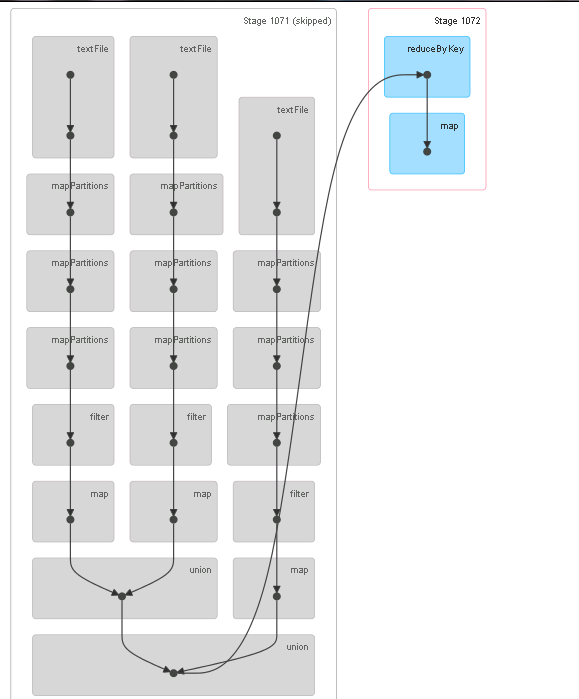
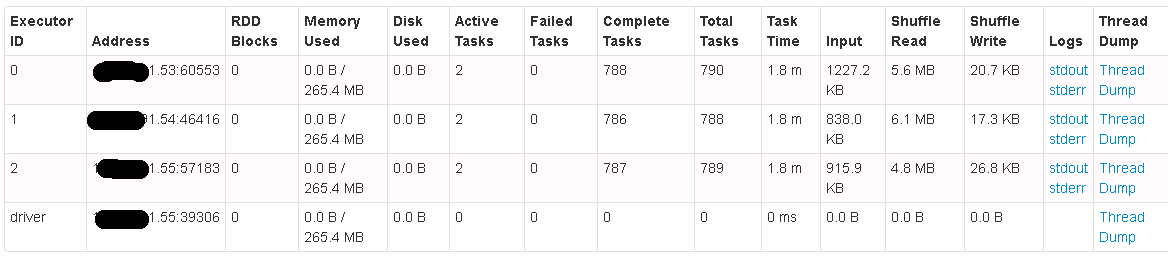
I had previously attempted this using dataframes, but the solution was not as clean. I like this solution because nothing is collected from RDDs into the driver; it runs distributed at every stage. I ran and tested this application on a Spark Standalone Cluster on HDP Stack with 4 nodes.
Let me know your thoughts, please do comment. The entire code is available in github, this post intends to explain the same.